作者: 文章来源:
本文原地址:https://www.mimiwuqi.com/webqianduan/197094.html
目录文章目录Flutter 中的Row控件就是水平控件,它可以让Row里边的子元素进行水平排列。
Row控件可以分为灵活排列和非灵活排列两种,这两种模式都需要熟练掌握,等经验丰富后可根据需求进行使用。
从字面上就可以理解到,不灵活就是根据 Row 子元素的大小,进行布局。如果子元素不足,它会留有空隙,如果子元素超出,它会警告。
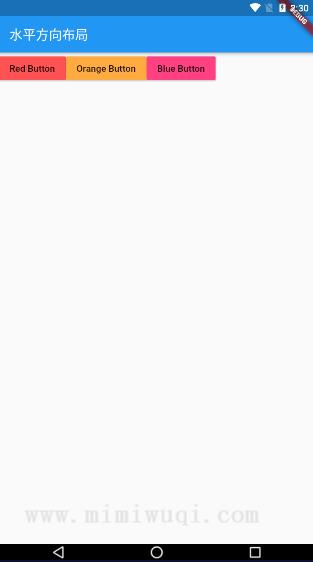
比如现在我们要制作三个按钮,并让三个按钮同时在一排。我们写下了如下代码,但你会发现效果并不理想。
import 'package:flutter/material.dart';

void main() => runApp(MyApp());

class MyApp extends StatelessWidget {
  @override
  Widget build(BuildContext context) {
    return MaterialApp(
      title: 'ListView widget',
      home: Scaffold(
          appBar: AppBar(
            title: Text('水平方向布局'),
          ),
          body: Row(
            children: [
              RaisedButton(
                  onPressed: () {},
                  color: Colors.redAccent,
                  child: Text('Red Button')),
              RaisedButton(
                onPressed: () {},
                color: Colors.orangeAccent,
                child: Text('Orange Button'),
              ),
              RaisedButton(
                  onPressed: () {},
                  color: Colors.pinkAccent,
                  child: Text('Pink Button'))
            ],
          )),
    );
  }
}
效果如下:
更多 建站教程 请访问 https://www.mimiwuqi.com/webqianduan/