
最近项目里需要用到步骤条的功能,但是ui给出的设计图我一看在antd上都没有这种样式的步骤条啊,所以得自己手动实现封装一个步骤条组件来使用,先看一下封装后的步骤条效果图:
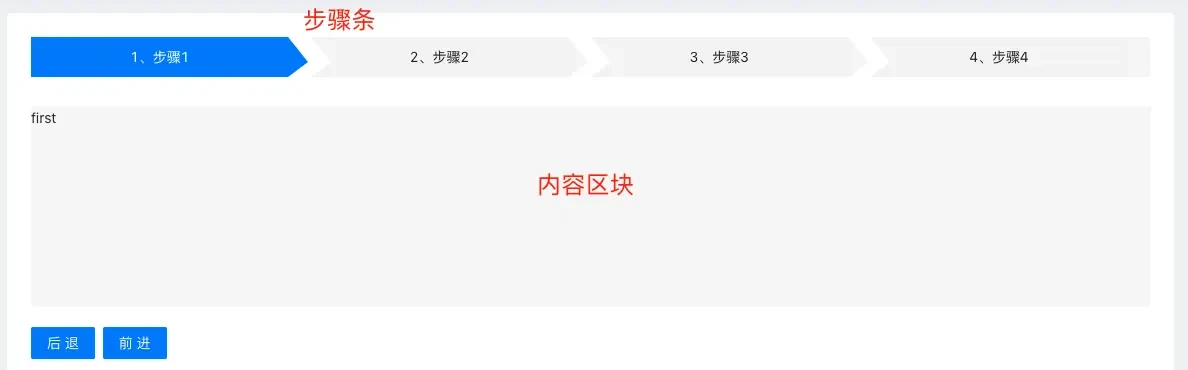
完整代码
这里就两个文件不到 200 行的代码:css 文件和tsx 文件
CustomSteps 文件:
import classnames from "classnames";

import styles from "./index.less";

type StepObjType = {
  key: string;
  title: string;
  content: React.ReactNode | string | undefined;
};

interface CustomStepsProps {
  current: number;
  items: StepObjType[];
}

const CustomSteps: React.FC<CustomStepsProps> = ({ current = 1, items = [] }) => {
  // 步骤条内容
  const StepContent = ({ title, stepNumber }: { title: string; stepNumber: number }) => (
    <div
      className={classnames(styles.block, {
        [styles.bgColor]: current !== stepNumber,
        [styles.active]: current == stepNumber,
      })}
    >
      {title}
    </div>
  );

  // 这里只有最后步骤条或者中间的步骤条才有,第一个没有
  const StepAfterNode = ({ stepNumber }: { stepNumber: number }) => (
    <samp
      className={classnames(styles.less1, styles.left, {
        [styles.bgColor]: current !== stepNumber,
      })}
    ></samp>
  );

  return (
    <div className={styles.stepsPage}>
      <ul>
        {items?.map((item: StepObjType, index: number) => {
          const stepNumber = index + 1;
          let node = undefined;
          if (stepNumber == 1) {
            node = (
              <li key={item.key} style={{ width: `calc( 100% / ${items.length})` }}>
                <StepContent stepNumber={stepNumber} title={item?.title} />
                <span
                  className={classnames(styles.less, {
                    [styles.bgBorderColor]: current !== stepNumber,
                  })}
                ></span>
              </li>
            );
          } else if (index == items.length - 1) {
            node = (
              <li key={item.key} style={{ backgroundColor: current == stepNumber ? "#007eff" : "#f5f5f5f5", width: `calc( 100% / ${items.length})` }}>
                <StepAfterNode stepNumber={stepNumber} />
                <StepContent stepNumber={stepNumber} title={item?.title} />
              </li>
            );
          } else {
            node = (
              <li key={item.key} style={{ width: `calc( 100% / ${items.length})` }}>
                <StepAfterNode stepNumber={stepNumber} />
                <StepContent stepNumber={stepNumber} title={item?.title} />
                <span
                  className={classnames(styles.less, styles.right, {
                    [styles.bgBorderColor]: current !== stepNumber,
                  })}
                ></span>
              </li>
            );
          }
          return node;
        })}
        <div className={styles.clearfix}></div>
      </ul>
      {/* content */}
      <div className={styles.stepscontent}>{items[current - 1]?.content}</div>
    </div>
  );
};

export default CustomSteps;
CSS 文件:
.stepsPage {
  .clearfix {
    clear: both;
  }
  ul {
    width: 100%;
    padding: 0;
    list-style: none;
  }
  li {
    position: relative;
    float: left;
    // width: 376px;
    // width: calc(100% / 4);
    height: 40px;
    margin-bottom: 10px;
    list-style: none;
    flex: 1;
  }
  .less {
    top: 0;
    border-color: transparent transparent transparent #007eff;
    border-style: dashed dashed dashed solid;
    border-width: 25px 0 15px 20px;
    transition: all 0.5;
  } /*dashed 设置透明*/
  .less1 {
    top: 0;
    border-color: transparent transparent transparent #fff;
    border-style: dashed dashed dashed solid;
    border-width: 25px 0 15px 20px;
  }
  .right {
    right: 0;
  }
  .left {
    left: 0;
  }
  samp {
    position: absolute;
    z-index: 2;
    display: block;
  }
  span {
    position: relative;
    z-index: 3;
    display: block;
    float: left;
  }
  .block {
    z-index: 1;
    float: left;
    // width: 357px;
    width: 92%;
    height: 40px;
    color: #222222;
    line-height: 40px;
    text-align: center;
    vertical-align: middle;
    background: #007eff;
  }
  .bgColor {
    background: #f5f5f5;
  }
  .bgBorderColor {
    border-color: transparent transparent transparent #f5f5f5;
  }
  .active {
    color: #fff;
  }

  .stepscontent {
    width: 100%;
    height: 200px;
    margin-top: 20px;
    background-color: #f7f7f7;
  }

  @media screen and (max-width: 1230px) {
     .block {
      width: 90%;
     }
  }
  @media screen and (max-width: 848px) {
    .block {
     width: 86%;
    }
 }
}
以上就是 React 封装的一个步骤条组件,希望对大家有帮助,如果上面的实现有啥问题,欢迎各位大佬指点指点啊。