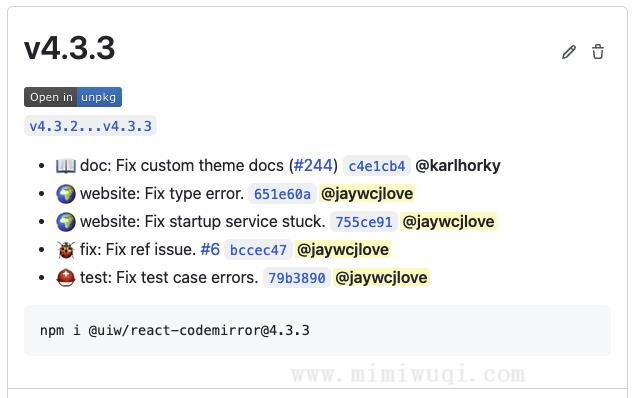
GitHub Action 持续集成服务推出有一段时间了,目前已经免费开放使用,由于个人项目都是放在 Github 上有点多,使用它来发布、测试、部署,是极大的提高了生产力。
下面通过一些实例来说明,我们可以在那些地方可以提高生产力。
入门
我们只需要在项目的 .github/workflows/ 目录下配置 yml 文件,配置触发事件既可以,例如 .github/workflows/ci.yml 中,我们在 master 分支进行 push,就可以出发这个工作流。
name: CI
on:
  push:
    branches:
      - master
为这个工作流添加一些任务,通过使用 actions/checkout 拉代码,使用 actions/setup-node 安装制定的 nodejs 版本:
name: CI
on:
  push:
    branches:
      - master

jobs:
  build-deploy:
    runs-on: ubuntu-18.04
    steps:
      - uses: actions/checkout@v2
      - uses: actions/setup-node@v2
        with:
          node-version: 14
你可以添加更多的步骤完成简单的测试,例如安装依赖,编译代码,运行测试用例等:
jobs:
  build-deploy:
    runs-on: ubuntu-18.04
    steps:
      - uses: actions/checkout@v2
      - uses: actions/setup-node@v2
        with:
          node-version: 14
      - run: npm install
      - run: npm run build
      - run: npm run coverage
      - run: npm run bundle
      - run: npm run bundle:min
      - run: npm run doc
自动打 tag
配置一个步骤,通过判断 package.json 中的变化自动创建一个 tag。
- name: Create Tag
  id: create_tag
  uses: jaywcjlove/create-tag-action@v1.3.6
  with:
    package-path: ./package.json
自动生成 released
通过判断 tag 创建成功是否成功(if: steps.create_tag.outputs.successful),来自动创建一个 released:
- name: Create Release
  uses: ncipollo/release-action@v1
  if: steps.create_tag.outputs.successful
  with:
    token: ${{ secrets.GITHUB_TOKEN }}
    name: ${{ steps.create_tag.outputs.version }}
    tag: ${{ steps.create_tag.outputs.version }}
自动生成 released 的详情描述
使用 jaywcjlove/changelog-generator 获取 commit 的日志,在创建 released 的时候使用
- name: Generate Changelog
  id: changelog
  uses: jaywcjlove/changelog-generator@v1.5.0
  with:
    head-ref: ${{steps.create_tag.outputs.version}}
    filter-author: (renovate-bot|Renovate Bot)
    filter: '[R|r]elease[d]s+[v|V]d(.d+){0,2}'
- name: Create Release
  uses: ncipollo/release-action@v1
  if: steps.create_tag.outputs.successful
  with:
    token: ${{ secrets.GITHUB_TOKEN }}
    name: ${{ steps.create_tag.outputs.version }}
    tag: ${{ steps.create_tag.outputs.version }}
    body: |
      Comparing Changes: ${{ steps.changelog.outputs.compareurl }}

      ${{ steps.changelog.outputs.changelog }}