
- 渐变文字
- 修改 media defaults
- column-count
- 使用 position 居中元素
- 逗号分隔的列表
- 平滑的滚动
- hyphens
- first-letter
- accent-color
- 图像填充文本
- placeholder 伪元素
- colors 动画
- clamp() 函数
- selection 伪类
- 十进制前导零
- 自定义光标
- caret-color
- only-child
渐变文字
h1{
  background-image: linear-gradient(to right, #c6ffdd, #fbd786, #f7797d);
  background-clip: text;
  -webkit-background-clip: text;
  color: transparent;
}
修改 media defaults
编写 css 重置时,添加这些属性以改善媒体默认值。
img, picture, video, svg {
  max-width: 100%;
  object-fit: contain;  /* preserve a nice aspect-ratio */
}
column-count
使用列属性为文本元素制作漂亮的列布局。
p{
  column-count: 3;
  column-gap: 5rem;
  column-rule: 1px solid salmon; /* border between columns */
}
使用 position 居中元素
div{
  position: absolute;
  top: 50%;
  left: 50%;
  transform: translate(-50%,-50%);
}
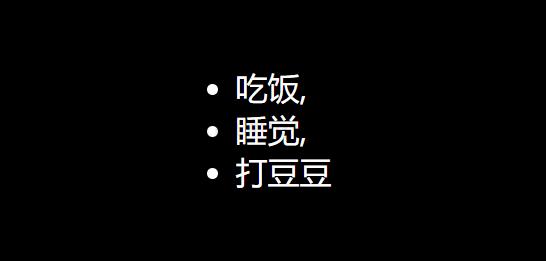
逗号分隔的列表
li:not(:last-child)::after{
  content: ',';
}
自定义光标
html{
  cursor:url('no.png'), auto;
}
caret-color
caret-color 属性用来定义插入光标(caret)的颜色,这里说的插入光标,就是那个在网页的可编辑器区域内,用来指示用户的输入具体会插入到哪里的那个一闪一闪的形似竖杠 | 的东西。
only-child
CSS 伪类 :only-child 匹配没有任何兄弟元素的元素。等效的选择器还可以写成 :first-child:last-child 或者 :nth-child(1):nth-last-child(1) ,当然,前者的权重会低一点。