animation-play-state属性主要用来控制元素动画的播放状态。
参数:
其主要有两个值:running和paused。
其中running是其默认值,主要作用就是类似于音乐播放器一样,可以通过paused将正在播放的动画停下来,也可以通过running将暂停的动画重新播放,这里的重新播放不一定是从元素动画的开始播放,而是从暂停的那个位置开始播放。另外如果暂停了动画的播放,元素的样式将回到最原始设置状态。
例如,页面加载时,动画不播放。代码如下:
animation-play-state:paused;
实例演示:
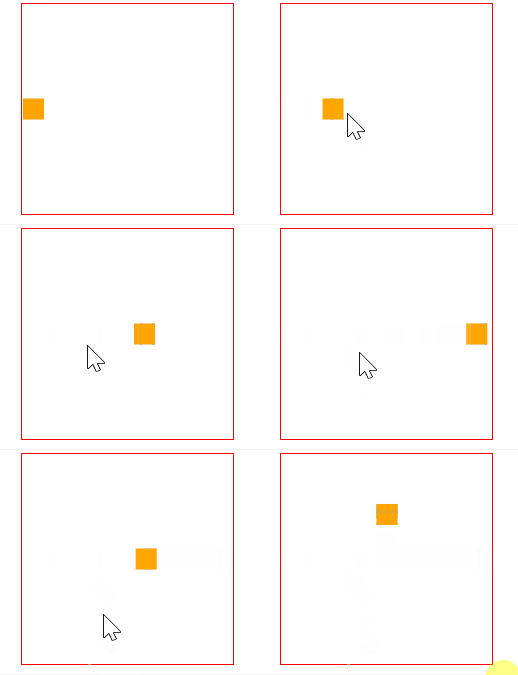
让停止的动画在 hover 的时候播放,不是 hover 状态停止。
HTML 代码:
<div><span></span></div>
CSS 代码:
@keyframes move {
  0%{
    transform: translateY(90px);
  }
  15%{
    transform: translate(90px,90px);
  }
  30%{
    transform: translate(180px,90px);
  }
  45%{
    transform: translate(90px,90px);
  }
  60%{
    transform: translate(90px,0);
  }
  75%{
    transform: translate(90px,90px);
  }
  90%{
    transform: translate(90px,180px);
  }
  100%{
    transform: translate(90px,90px);
  }
}

div {
  width: 200px;
  height: 200px;
  border: 1px solid red;
  margin: 20px auto;
}
span {
  display: inline-block;
  width: 20px;
  height: 20px;
  background: orange;
  transform: translateY(90px);
  animation-name: move;
  animation-duration: 10s;
  animation-timing-function: ease-in;
  animation-delay: .2s;
  animation-iteration-count:infinite;
  animation-direction:alternate;
  animation-play-state:paused;
}
div:hover span {
  animation-play-state:running;
}
效果如下: