
最近在做一个 vue 后台项目,需要一个 json 编辑器,要求能够格式化 json 数据,同时也支持编辑功能。搜搜索索一堆发现 bin-code-editor 插件就可以实现这个功能,话不多说,搞起来。
bin-code-editor
代码编辑器组件,0.1.0 版本默认只支持 json 代码,后期再进行扩展。
npm 安装
推荐使用 npm 安装,它能更好地和 webpack 打包工具配合使用。而且可以更好的和 es6 配合使用。并且支持按需引入
npm i bin-code-editor -S
# or
yarn add bin-code-editor
引入
在 main.js 中写入 2 行
import Vue from 'vue';
import CodeEditor from 'bin-code-editor';
import 'bin-code-editor/lib/styles/index.css';
import App from './App.vue';

Vue.use(CodeEditor);

new Vue({
  el: '#app',
  render: h => h(App)
});
test.vue 文件
<template>
  <div style="width: 70%;margin-left: 30px;margin-top: 30px;">
    <b-code-editor v-model="jsonStr" :auto-format="true" :smart-indent="true" theme="dracula" :indent-unit="4" :line-wrap="false" ref="editor"></b-code-editor>
    <br>
    <el-button type="primary" @click="onSubumit">提交</el-button>
  </div>
</template>

<script>
  const jsonData =`{
    "employees": [{
      "firstName": "Bill",
      "lastName": "Gates"
    }, {
      "firstName": "George",
      "lastName": "Bush"
    }, {
      "firstName": "Thomas",
      "lastName": "Carter"
    }]
  }`
  export default {
    data() {
      return {
        jsonStr:jsonData
      }
    },
    methods: {
      // 检测 json 格式
      isJSON(str) {
        if (typeof str == 'string') {
          try {
            var obj=JSON.parse(str);
            if(typeof obj == 'object' && obj ){
              return true;
            }else{
              return false;
            }

          } catch(e) {
            return false;
          }
        }else if (typeof str == 'object'  && str) {
          return true;
        }
      },
      onSubumit(){
        if (!this.isJSON(this.jsonStr)){
          this.$message.error(`json 格式错误`)
          return false
        }
        this.$message.success('json 格式正确')
      }
    }
  }
</script>
<style>

</style>
访问测试页面,效果如下:
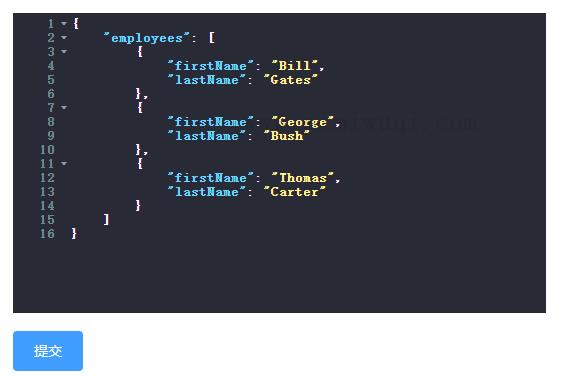
注意:这个 json 编辑会带有下来菜单,实际项目中,需要去除,比较用户误操作。
在实际使用中发现几个问题:
- 输入中文时,传给后端的值不多;
- 输入大量 json 时,会有部分数据丢失。
因此,因此最终我们使用了 bin-code-editor 编辑器。
总结
以上就是自己在实际项目中测试使用的两个 vue 版的 json 插件心得,至于用哪一个,小伙伴们根据自己的实际需要来定,感谢阅读。