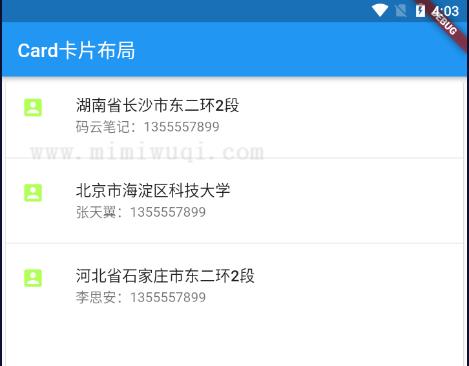
Flutter 还有一种比较比较酷炫的布局方式,我称 它为卡片式布局。这种布局类似 ViewList,但是列表会以物理卡片的形态进行展示。
实例开发
比如我们现在要开发一个类似收获地址的列表,并且列表外部使用一个卡片式布局。
卡片式布局默认是撑满整个外部容器的,如果你想设置卡片的宽高,需要在外部容器就进行制定。
代码中使用了一个垂直布局组件 Column 组件,然后利用了ListTile实现内部列表,这里需要说明的是 ListTile 不光可以使用在 ListView 组件中,然后容器组件其实都可以使用。代码如下.
import 'package:flutter/material.dart';

void main() => runApp(MyApp());

class MyApp extends StatelessWidget {
  @override
  Widget build(BuildContext context) {
    var card = Card(
      child: Column(
        children: [
          ListTile(
            title: Text(
              '湖南长沙市东二环 2 段',
              style: TextStyle(fontWeight: FontWeight.w500),
            ),
            subtitle: Text(':1355557899'),
            leading: Icon(
              Icons.account_box,
              color: Colors.lightBlue,
            ),
          ),
          Divider(),
          ListTile(
            title: Text(
              '北京市海淀区科技大学',
              style: TextStyle(fontWeight: FontWeight.w500),
            ),
            subtitle: Text('张天翼:1355557899'),
            leading: Icon(
              Icons.account_box,
              color: Colors.lightBlue,
            ),
          ),
          Divider(),
          ListTile(
            title: Text(
              '河北省石家庄市东二环 2 段',
              style: TextStyle(fontWeight: FontWeight.w500),
            ),
            subtitle: Text('李思安:1355557899'),
            leading: Icon(
              Icons.account_box,
              color: Colors.lightBlue,
            ),
          ),
          Divider(),
        ],
      ),
    );

    return MaterialApp(
      title: 'ListView widget',
      home: Scaffold(
        appBar: new AppBar(
          title: new Text('卡片布局'),
        ),
        body: Center(child: card),
      ),
    );
  }
}
效果如下: