
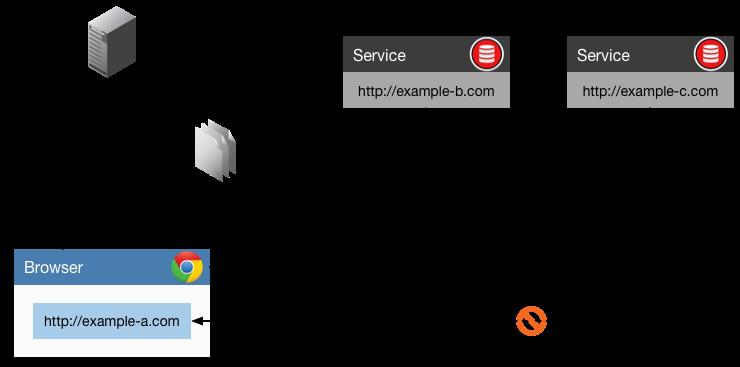
用选项配置 CORS
还可以用自定义选项来配置 CORS。可以根据需要配置允许的 HTTP 方法,例如 GET 和 POST。
下面是通过 CORS 选项允许单个域访问的方法:
var corsOptions = {
    origin: 'http://localhost:8080',
    optionsSuccessStatus: 200 // For legacy browser support
}

app.use(cors(corsOptions));
如果你在源中配置域名-服务器将允许来自已配置域的 CORS。因此,在我们的例子中,可以从 http://localhost:8080 访问该 API,并禁止其他域使用。
如果发送一个 GET 请求,则任何路径都应该可以访问,因为这些选项是在应用在程序级别上的。
运行下面的代码将请求从 http://localhost:8080 发送到 http://localhost:2020:
//
fetch('http://localhost:2020/')
  .then(response => response.json())
  .then(data => console.log(data))
  .catch(err => console.error(err));

//
fetch('http://localhost:2020/name/janith')
  .then(response => response.json())
  .then(data => console.log(data))
  .catch(err => console.error(err));
可以看到被允许从该程序和域中获取信息。
还可以根据需要配置允许的 HTTP 方法:
var corsOptions = {
    origin: 'http://localhost:8080',
    optionsSuccessStatus: 200 // 对于旧版浏览器的支持
    methods: "GET, PUT"
}

app.use(cors(corsOptions));
如果从 http://localhost:8080 发送 POST 请求,则浏览器将会阻止它,因为仅支持 GET 和 PUT:
fetch('http://localhost:2020', {
  method: 'POST',
  body: JSON.stringify({name: "janith"}),
})
.then(response => response.json())
.then(data => console.log(data))
.catch(err => console.error(err));
用函数配置动态 CORS 源
如果配置不满足你的要求,也可以创建函数来定制 CORS。
例如假设要允许 http://something.com 和 http://test1.com 对 .jpg 文件进行 CORS 共享:
const allowlist = ['http://something.com', 'http://test1.com'];

    const corsOptionsDelegate = (req, callback) => {
    let corsOptions;

    let isDomainAllowed = whitelist.indexOf(req.header('Origin')) !== -1;
    let isExtensionAllowed = req.path.endsWith('.jpg');

    if (isDomainAllowed && isExtensionAllowed) {
        // 为此请求启用 CORS
        corsOptions = { origin: true }
    } else {
        // 为此请求禁用 CORS
        corsOptions = { origin: false }
    }
    callback(null, corsOptions)
}

app.use(cors(corsOptionsDelegate));
回调函数接受两个参数,第一个是传递 null 的错误,第二个是传递 { origin: false } 的选项。第二个参数可以是用 Express 的 request 对象构造的更多选项。
所以 http://something.com 或 http://test1.com 上的 Web 应用将能够按照自定义配置从服务器引用扩展名为 .jpg 的图片。
这样可以成功引用资源文件:
<img src="http://yoururl.com/img/cat.jpg">
但是下面的文件将会被阻止:
<img src="http://yoururl.com/img/cat.png">
从数据源加载允许的来源列表作
还可以用保存在数据库中的白名单列表或任何一种数据源来允许 CORS:
var corsOptions = {
    origin: function (origin, callback) {
        // 从数据库加载允许的来源列表
        // 例如:origins = ['http://test1.com', 'http//something.com']
        database.loadOrigins((error, origins) => {
            callback(error, origins);
        });
    }
}

app.use(cors(corsOptions));
结语
在本文中,我们介绍了 CORS 是什么以及如何使用 Express 配置它。然后,我们为所有请求,特定请求,添加的选项和限制设置了 CORS,并为动态 CORS 配置定义了自定义功能。
原文链接:点击这里
译: